Skip to content

perl

Show text files width

I am often working with fixed width text files. Sometimes text files aren't produced properly, so I have to make sure that all rows share the same width.

This is one liner perl thay I use quite often, on a Windows shell:

c:\> perl -lne "$h{length($_)}=1; END{print join \"\n\", sort keys %h}" source.txt

this is how it looks like in Linux, with a simpler way of quoting:

$ perl -lne '$h{length($_)}=1; END{print join "\n", sort keys %h}' source.txt
  • the -l flag handles newlines
  • the -n flag adds a while loop

for each line we calculate its length with length($_), we set the hash element $h{length($_)} to 1, which means that we have at least one row with the calculated length. When we are finished scanning the file, we print the list of hash keys in sorted order, which is the list of calculated lengths.

If the one liner returns only one length then we are fine, all rows share the same, hopefully correct, width. If it returns more lengths then I'll have to further investigate the problem.

Pratical use of Sql::Textify

I know that perl is considered out of fashion nowadays, but for some tasks it's still a good and handy choice. Here's a practical use of my module Sql::Textify. Every morning I need to check the status of some tasks, like the number of times my web services have been called the day before, with some performance analysis and the number of errors. At the same time I want to know if my pentaho tasks are all finished. And I want to know if all my backups are updated.

Luckily I managed to write all the info I need into some sql tables, updated automatically. So basically I just need to login to my Adminer.php instance and run some queries or some views. But how if I need to share those info to my colleagues? I can quickly export a dataseto to a Markdown text file, ready to be beautified with Markdown Here plugin.

But I wanted to make things more practical and faster. My initial idea was to make a Mason2 plugin that calls Sql::Textify and this might still be a good idea to handle complex contents, but since my content is often simple and Mason2 is out of fashion anyways, I wrote a simple script that handles everyting.

Here's an example. First we need a very simple template html page:

<html>
<header>
<style>
..insert a good style..
</style>
<title>[[ $title ]]</title>
</header>
<body>
[[ $body ]]
</body>
</html>

then the perl script is like this:

use strict;
use warnings;
use SQL::Textify;
use File::Slurp;

my $t = Sql::Textify->new(
    conn => "dbi:SQLite:dbname=samples.db",
    username => "username",
    password => "password",
    format => 'html'
);

# read the template file
my $html = read_file( 'main.html' );

# set the title
my $title = "Report Indicizzazione";

# set the content of the main component
my $body = <<'BODY';
<h1>Daily report</h1>

<h2>Public Web Service</h2>

<% $t->textify("select * from view_web_service_status where eventdate>=currentdate"); %>

<h2>Pentaho Integrations Log</h2>

<% "select * from view_pentaho_log" | $t->textify %>
BODY

# first syntax, evaluates code between <% and %>
$body =~ s /\<\%\s+(.*?);\s+\%\>/$1/eeg;

# second syntax, apply $t->textify to the query (works as a filter)
$body =~ s /\<\%\s+(\".*?\")\s*\|(.*?)\s+\%\>/"$2\($1\)"/eeg;

# convert all [[ $variable ]] to the actual value
$html =~ s/\[\[ (\$\w*) \]\]/$1/eeg;

print $html;

This is not a perfect solution, but I just needed a quick tool to export my data and I wanted it to look good. The syntax is inspired somehow to the Mason2 syntax. A real Mason2/(or anything else) component of course is much more flexible but at the same time is little slower to write and more difficult to mantain.

Markdown filter for Mason2

Mason comes with some built-in filters that can be used to process portions of content in a component. The standard way to invoke a filter is in a block:

    % $.Trim \{\{
        This string will be trimmed
    % \}\}
    # end Trim

but filters can appear also inside a <% %> tag:

<% $content | NoBlankLines,Trim %>

More details can be found at the official Mason::Manual::Filters page. Here's how to create a custom filter:

package MyApp::Filters;
use Mason::PluginRole;

method Upper () {
    return sub { uc($_[0]) }
}

method Lower () {
    return sub { lc($_[0]) }
}

1;

I wanted to use a custom filter that converts Markdown text to HTML, so I installed the Text::Multimarkdown module and I created a filter like this:

package MyApp::Filters;
use Mason::PluginRole;
use Text::MultiMarkdown qw(markdown);

method Markdown () {
    my $m = Text::Markdown->new;
    return sub { markdown($_[0]) }
}

1;
which I put in lib/MyApp directory. Then I tried it in a index.mc page:

<%class>
  with 'Markdown::Filters';
</%class>

<%
"
## Markdown

This page is written using **markdown** syntax:

- it's using the `Text::MultiMarkdown` library
- it's a lot of fun
- `Mason2` is great!
" | Markdown
%>

another way using the block invocation syntax:

<%class>
  with 'Markdown::Filters';
</%class>

<h1>Let's try the block invocation syntax</h1>

% $.Markdown \{\{
## Do tables work?

id | description
---|------------
01 | begin at the beginning
02 | go on till you come to the end
03 | then stop

yes `MultiMarkdown` supports tables as well.
% \}\}

one more way is to use a Base component, telling to process all inner components with Markdown:

<%class>
  with 'Markdown::Filters';
</%class>

<%augment wrap>
  <html>
    <head>
      <link rel="stylesheet" href="/static/css/style.css">
      <title>Mason and Markdown</title>
    </head>
    <body>
% $.Markdown \{\{
      <% inner() %>
% \}\}
    </body>
  </html>
</%augment>

then your page can contain just Markdown syntax, here's an index.mc example page (an empy line at the beginning seems to be needed here):

# Only Markdown

This page will only contain Markdown syntax, but it will be converted to HTML:

% foreach my $i (qw(one two three)) {
  - <% $i %>
% }

yes you can still use perl code on it!

Tiles Page

Cruscotto

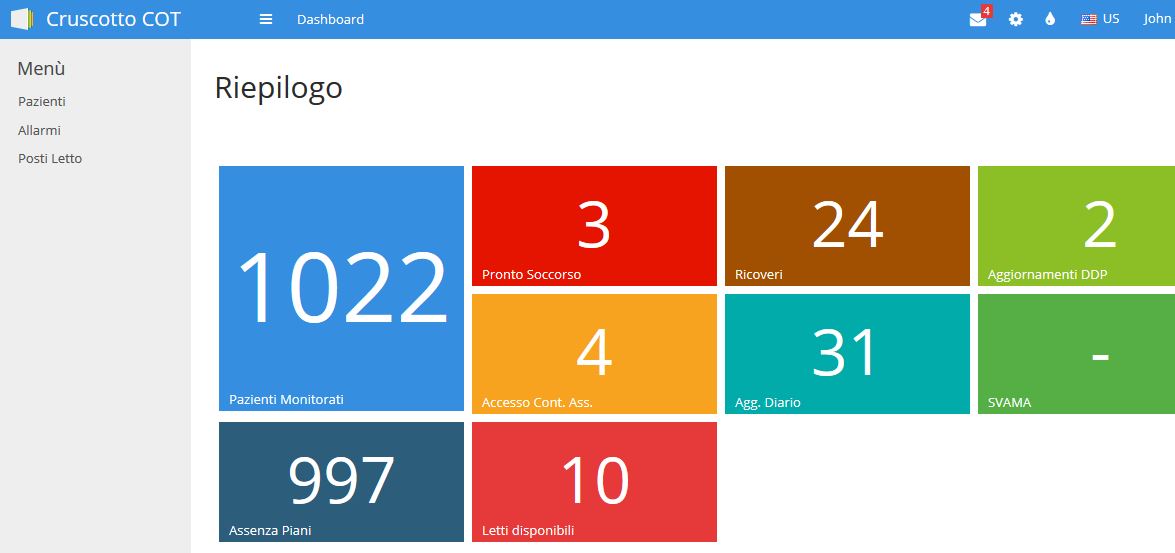
For my new application, I had to develop a summary page with all alarms in a single location: a tiles page is perfect for this purpose!

Of course, data has to be fetched using AJAX, however I didn't have a tiles module ready so this was the right moment to start developing one!

A tiles page is implemented like an unordered list:

<ul class="tiles">
  <li class="blue high long">
    <a href="pazienti_cot">
      <span class='count'></span>
      <span class='name'>Pazienti Monitorati</span>
    </a>
  </li>
  <li>
    ...
  </li>
</ul>

I just added a data-ajax-source data column on the ui tag (here's where we will fetch the counts) and a data-value that specifies the row where to get the counts. The AJAX data source will be in the same format as a datatables data source (because I'm lazy and I can reuse the same module hehe):

{
    "aaData":[
      ["PAZIENTI","1021"],
      ["TERR-RICOVERO","1"],
      ["TERR-ASSENZAPIANI","997"],
      ["OSP-DDP","5"],
      ["TERR-AGGDIARIOCA","30"],
      ["OSP-RICOVERO","24"],
      ["OSP-PS","4"],
      ["TERR-ACCESSOCA","5"],
      ["LETTI","10"]
    ],
    "iTotalRecords":"9",
    "iTotalDisplayRecords":"9",
    "sEcho":null
}

The tiles widget will be called as this:

  tiles-widget.mi,
    tiles => {
      json => "json/riepilogo.json",
      columns => [
        { caption => 'Pazienti Monitorati', value => 'PAZIENTI',          class => 'blue high long', href => 'pazienti_cot' },
        { caption => 'Pronto Soccotso',     value => 'OSP-PS',            class => 'red long',       href => '#' },
        { caption => 'Ricoveri',            value => 'OSP-RICOVERO',      class => 'brown long',     href => '#' },
        { caption => 'Aggiornamenti DDP',   value => 'OSP-DDP',           class => 'lime long',      href => '#' },
        { caption => 'Accesso Cont. Ass.',  value => 'TERR-ACCESSOCA',    class => 'orange long',    href => '#' },
        { caption => 'Agg. Diario',         value => 'TERR-AGGDIARIOCA',  class => 'teal long',      href => '#' },
        { caption => 'SVAMA',               value => 'TERR-SVAMA',        class => 'satgreen long',  href => '#' },
        { caption => 'Assenza Piani',       value => 'TERR-ASSENZAPIANI', class => 'satblue long',   href => '#' },
        { caption => 'Letti Disponibili',   value => 'LETTI',             class => 'lightred long',  href => 'letti_cot' },
      ]
    }
that will create a tiles html structure like the one above:

            <ul class="tiles" data-ajax-source="{json} %>">
% foreach my $box (@{$.tiles->{columns}}) {
               <li class="{class} %>" data-value="{value} %>">
                <a href="{href} %>">
                  <span class='count'></span>
                  <span class='name'>{caption} %></span>
                </a>
              </li>
% }
            </ul>

then the magic starts in the sentosa.js module:

function init_tile(tile) {
    $.getJSON( tile.attr("data-ajax-source"), function( data ) {
        // create an hash from the json aaData
        var a = data["aaData"];
        var h = {};
        for (var i=0; i< a.length; i++) {
            h[ a[i][0] ] = a[i][1];
        };
        // loop through all elements, and set data from the hash
        // (yes, I could directly read aaData and put it inside the html... but I also want to put - where data is not avaliable, so I have to use an hash first)
        $("li", tile).each(function () {
            $('span.count', this).text(h[$(this).attr("data-value")] || '-');
        });
    });
}

okay, this "init" will load the JSON, parse it in a map data structure, then loop through each li element and put the value accordingly to the data-value tag (or put the - symbol if not available). I will then call it every some seconds:

setInterval (function autoRefresh() {
    /* refresh all tiles */
    $('ul[data-ajax-source]').each(function () {
        init_tile($(this));
    });
}, 30000);

This link looks interesting if I want to build a more professional and reusable plugin: Basic Plugin Creation

¡Hasta pronto!

Shared Recordset Definition

I think that the modules I developed for Sentosa Autoforms are quite elegant and flexible (expecially the Sentosa::SQL module, and the DataDatables and JSON modules) so I decided to reuse them! However I don't like the fact that Sentosa Autoforms is all driven by database data.. while it's sometimes very convenient, I don't like the layer of complexity that it adds.

So I started to work on it, trying to figure out a simpler solution!

First of all, I needed to store all recordset information on a variable, shared to all components. The hashref recordset goes to the Base.mp pure perl component:

my $recordset = {
  # Allarms
  "alarms" => {
    description => 'Alarms',
    connection => { db => 'dbi:Pg:dbname=dbname;host=10.10.10.10', username => 'myusername', password => 'mypassword' },
    source => "alarms",
    pk => 'id',
    columns => [
        { col => 'paziente',                 caption => 'Paziente', type => 'text', 'link-id' => '4' },
        { col => 'data_nascita',             caption => 'Data Nasc', type => 'text' },
        { col => 'dataora',                  caption => 'Data/ora PS', type => 'text' },
        { col => 'osp_ps_priorita_ingresso', caption => 'Priorità', type => 'text' },
        { col => 'link_fascicolo',           caption => 'Fascicolo', type => 'hidden' }
      ],
    json => 'json/alarms.json'
  },
}

Pretty elegant! Also I can use all kinds of Perl stuff to make it more tidy or more compact (e.g. I can specify a connections hash_ref, and I can calculate the array_ref columns somehow.. also, Sentosa has to process every query every time we access a recordset, while with this systems I can pre-calculate all queries at runtime the first time we access it).

How can I share this recordset data to all components? I can specify a method at the end of the Base.mp component:

method getrecordset($rs) {
  return $recordset->{$rs};
}

and then the default handler inside the json directory can be just like this:

<%flags>
extends => '../Base.mp';
</%flags>
%class
  has '_id';
  has '_app';

  has 'iDisplayStart';
  has 'iDisplayLength';
  has 'iColumns';

  has 'sEcho';
</%class>
<%init>
  my ($recordset_name, $ext) = $m->path_info =~ /(.*)(\.json)$/;
  if (! $.getrecordset($recordset_name)) {
    $m->not_found();
  }
</%init>
<&
  ../query-data-widget.mi,
    obj => {
      source => $.getrecordset($recordset_name)->{source},
      pk     => $.getrecordset($recordset_name)->{pk},
      db     => $.getrecordset($recordset_name)->{connection}->{db},
      name   => 'allarmi_osp_ricovero',
      description => $.getrecordset($recordset_name)->{description},
      username => $.getrecordset($recordset_name)->{connection}->{username},
      password => $.getrecordset($recordset_name)->{connection}->{password}
    },
    columns => $.getrecordset($recordset_name)->{columns},

    iDisplayStart => $.iDisplayStart,
    iDisplayLength => $.iDisplayLength,
    iColumns => $.iColumns,
    sEcho => $.sEcho,
    searchArgs => $.args
&>

it will inherit only from the Base.mp (no html, only perl!) ... and yes, I know this is a little ugly and not too elegant, but at least I can use the query-data-widget (and the query-widget as well) without major updates. I will work on making it better :)

Ah only one thing has to be updated! instead of working on the $.columns object I figured out that I have to work on a local copy of the object:

    use Clone 'clone';
    my $local_columns = clone($.columns);

otherwise, everytime I modify the columns object to add a temporary filter, the next time the filter is still there - because it's a hash_ref!

To call the query widget I use this:

<&
  query-widget.mi,
    query => {
      id => 'osp-ps',
      json => $.getrecordset($recordset_name)->{json},
      description => $.getrecordset($recordset_name)->{description},
      pk => $.getrecordset($recordset_name)->{pk},
      columns => $.getrecordset($recordset_name)->{columns},
      params => { 'table_link'  => undef, 'hide_title'  => 1, 'hide_top'    => 1, 'hide_bottom' => 0 }
    }
&>

Well this environment is much more comfortable, I think I can add plenty of improvements soon, and I think I can write a good manual of how to use those components. See you soon!

SQL Markdown Builder

I like text editors, especially Sublime Text. And I like to work at the command line (on Linux, on Mac... but even on Windows 10 it has become very nice).

So it's pretty normal that everything I write is in Markdown syntax!

Since I work every day with SQL, and every day I have to prepare quick reports, extract some data, share some tables, share some rows... I needed a tool to run a SQL query against a database that returns a table in Markdown format!

This way I can easily copy & paste to a new mail, and format it nicely and professionally with markdown-here, quickly and without becoming crazy.

So I quickly wrote this tool and I called SQL Markdown Builder because it can easily be integrated with Sublime Text, even if it is not a native plugin.

Yes I know this is a little off topic from Mason and Sentosa, but this tool is written in Perl and... I included it in Sentosa anyway! So let's start!

Getting Started

Make sure you have installed perl, File::Slurp, Getopt::Long, DBI, and the DBD libraries for your database:

cpanm File::Slurp
cpanm Getopt::Long
cpanm DBI
cpanm DBD::SQLite
cpanm DBD::Pg
cpanm DBD::mysql
...

Run a query

Once everything is installed, you can write a single query, or more queries separated by a ; in a .SQL text file:

drop table if exists gardens;

create table gardens (
    id integer primary key,
    name varchar(100),
    city varchar(100)
);

insert into gardens (name, city) values
('Gardens By The Bay', 'Singapore'), ('Hyde Park', 'London'),
('Central Park', 'New York'), ('Villa Borghese', 'Rome'),
('Princes Street Gardens','Edinburgh');

select * from gardens;

and you can run your query file at the command line:

perl sqlbuild.pl -c dbi:SQLite:dbname=test.sqlite3 -s query.sql

the connection string is in the DBI format, this example is for SQLite so we don't need to specify a username or a password.

SQL Markdown Builder will execute every single query in sequence against the specified database. If the query is an INSERT or an UPDATE query, it will return '0 rows', otherwise it will return the results in Markdown format (nicely aligned):

0 rows
0 rows
0 rows

id | name                   | city
---|------------------------|----------
1  | Gardens By The Bay     | Singapore
2  | Hyde Park              | London
3  | Central Park           | New York
4  | Villa Borghese         | Rome
5  | Princes Street Gardens | Edinburgh

If some columns become too big, you can specify the maximum size of a column with -mw parameter (or use -h to see all parameters).

Instead of using the command line, you can also specify all connection strings, usernames, passwords inside the .SQL file itself:

/*
  conn="dbi:SQLite:dbname=test.sqlite3"
  username=""
  password=""
*/

This is very handy but not too secure (other users might peek inside your files, and also updating a password might become complicated).

Integration with Sublime Text

This is for Windows, but Linux and OSX will be very similar.

Just get the provided file Sql-mk-build.sublime-build, update the working_dir:

{
    "cmd": ["perl", "sqlbuild.pl", "-s", "$file" ],
    "working_dir": "c:\\GitHub\\Sql-mk-builder\\"
    "selector": "*.sql"
}

and move it to the build directoy:

C:\Users\YOURUSERNAMEHERE\AppData\Roaming\Sublime Text 3\Packages\User

then you can edit your .SQL files with Sublime Text, and see the results using CTRL+B.

Happy SQL & Markdown!
Systemctl start sentosa.service

I just started to publish my Sentosa web portal and users of my company are now starting to use it. Great!

I wanted to add a service on my CentOS server and I wanted to manage it with Systemd.

First I created a /etc/systemd/system/sentosa.service file that contains:

[Unit]
Description=Sentosa Autoforms
After=network.target

[Service]
ExecStart=/usr/local/bin/plackup -E production --port 5001 --access-log /var/www/apps/sentosa/logs/access.log /var/www/apps/sentosa/bin/app.psgi

the app.psgi is the standard file from GitHub, I just disabled the debug mode.

Now I can start, restart, stop my service with:

systemctl start sentosa.service
systemctl restart sentosa.service
systemctl stop sentosa.service

And I can monitor the tail of the logs with:

journalctl -u sentosa.service -f

DB.pm Library

Hello, I'm finally back! Yes not much posts lately, but lots of coding - it's a lot considering that I'm working full time and that this is only a side project on my spare time.

After some previous attempts, I decided that I had to write a library to manage queries, to apply filters and searches, to move to the first/last/previous/next record, and to update and insert data.

I finally came out with DB.pm library, and even if it still needs to be improved I'm very proud of how small, elegant and clean it is!

I might rename it to Sentosa::SQL as I might reuse it on other projects as well.

Syntax

You need to define a $columns array reference as the following:

my $columns = [
  { col => 'id', 'pk' => 1},
  { col => 'name'},
  { col => 'surname'}
];

where id is the primary key, and then you have to call selectQuery and get a hash reference like this:

my $q = Sentosa::Db::selectQuery(
  'mytable',
  $columns,
  'ASC',
  undef,
  0, #offset
  10, #number of records
  'SQLite'
);

this will return three queries and three array references like below:

  print $q->{query}, "\n";
  print "(".join(',', @{$q->{query_data}}).")\n";

  print $q->{query_search}, "\n";
  print "(".join(',', @{$q->{query_search_data}}).")\n";

  print $q->{query_limit}, "\n";
  print "(".join(',', @{$q->{query_limit_data}}).")\n";

yes I could just call the same function thrice with different parameters (that would make the library even more elegant), but at the moment I have good reasons to call it once, but I might change my mind in a near future.

  • query: is the query, with a first level filter
  • query_search: is the query with a first filter and second level search filter
  • query_limit: is the query with a first level filter and a second level search filter, and also a limit on the number of rows (useful for pagination)

Filters

There are two levels of filters, a main filter that is applied to all of the queries, and an additional search filter that is applied only to query_search and query_limit.

This could be useful because a main filter can be applied to a table, but the user can search for some records within the already filtered table.

For example, many users could have records in the same table:

ID User Song
1 1 AC-DC - Ride On.mp3
2 1 Metallica - Enter Sandman.mp3
3 2 The Sweet - Action.mp3
4 2 Sixx::AM - Life Is Beautiful.mp3
5 2 Metallica - Metal Militia.mp3

We can filter the previous table for each user, then the user can apply an additional filter:

my $columns = [
  { col => 'id', 'pk' => 1},
  { col => 'user', 'filter' => 1},
  { col => 'song', 'search' => 'Metallica', 'searchcriteria' => 'SUB'}
];

Global variable $dbh

The name of my project is "Sentosa AutoForms", and it is going to be driven by a SQL database. I'm using SQLite but it can be changed at a later time to MySQL or Postgresql.

Let's create my new project:

poet new Sentosa

cd Sentosa

and let's create our SQLite database. The schema goes on the db/schema.sql file:

create table if not exists af_info (
      id integer primary key autoincrement,
      attribute string not null,
      value string not null
    );

insert into af_info (attribute, value) values
('name', 'Sentosa AutoForms'),
('version', '0.01');

and the actual database data goes to data/sentosa.db:

sqlite3 -batch data/sentosa.db < db/schema.sql

This is how I would access this DB with a standard Perl application (using the DBI module):

{% raw %}
#!/usr/bin/perl

use strict;
use warnings;
use DBI;

my $dbh = DBI->connect(          
    'dbi:SQLite:dbname=../data/sentosa.db',
    '',                          
    '',                          
    { RaiseError => 1 },         
) or die $DBI::errstr;

my $sth = $dbh->prepare('SELECT value FROM af_info WHERE attribute="name"');
$sth->execute();

my $name = $sth->fetch();

print @$name;
print "\n";

$sth->finish();
$dbh->disconnect();
{% endraw %}

and this is how I am connecting to it in my web application:

{% raw %}
package Sentosa::Import;
use Poet::Moose;
extends 'Poet::Import';

use DBI;

method provide_var_dbh ($caller) {
  return DBI->connect(          
    'dbi:SQLite:dbname=data/sentosa.db',
    '',                          
    '',                          
    { RaiseError => 1 },         
  ) or die $DBI::errstr;
}
1;
{% endraw %}

and this is how I'm using it on my component index.mc:

{% raw %}
<%class>
use Poet qw($dbh);
</%class>
<% $.title %>
<%init>
my $sth = $dbh->prepare('SELECT value FROM af_info WHERE attribute="name"');
$sth->execute();

my $name = $sth->fetch();

$.title("Welcome to @$name");
</%init>
{% endraw %}

True Global Variable for Mason in Poet

A few days ago, while I was roaming around Singapore, I offered a bounty (twice) on an already existing question on StackOverflow Global Variable mason2 in Poet where the poster was asking how to use global variables in Mason. And I got a very nice and useful answer :)

Here I am describing how to get a true global and persistent variable. The content of a true global and persistent variable is preserved between requests.

Has your web server 10 different threads that answer HTTP requests? Then you'll end up having 10 different variables. Has your web server 1000 threads? Well... you got the idea!

But what's the proper use of such global variables? Any thread can potentially serve any request, so we cannot predict which server is going to answer which request. Private informations doesn't have to go here.

But most web applications are driven by some datatabase, and connecting to a database has cost in terms of performance. Since the database won't (usually) change between requests why do we have to establish the same database connection over and over again?

Actually, we don't have to: we can define a global variable $dbh whose value is a valid database handler, which will be preserved between requests. This database handler value will born with the thread and will die with the thread!

Oh but we still have to be careful since the handler could have been valid at the time of the creation of the thread, but then something bad could have happened (e.g. a timeout could have occoured, or some evil DBA might had killed your connection, just for the sake of it). Somehow we'll have to manage this.

Okay now the fun part. Please read Poet::Import and the awarded answer which I'm going to use as a reference, and then let's do some coding!

Global Variable Example

# generate app Myapp
poet new Myapp
cd Myapp

add a class Myapp::Import, here's where we have to define our global variables:

vi lib/Myapp/Import.pm

and then let's add some code:

package Myapp::Import;
use Poet::Moose;
extends 'Poet::Import';

# create some variable
has 'mytemp' => (is => 'ro', default => 'my temp value');

method provide_var_mytemp ($caller) {
    return $self->mytemp;
}
1;

then we can test our global variable in our components, let's print its value on comps/index.mc:

<%class>
use Poet qw($mytemp);
</%class>
I got this <% $mytemp %> variable.

Let's see how to store a database handler, on my next post!