Skip to content

sql

Nomi di colonna con spazi: fastidio estetico o problema di sicurezza?

Commento su un blog, in risposta a una discussione sui nomi di colonna non convenzionali nei database.

La maggior parte dei sistemi di database lo permette, qualsiasi carattere può essere utilizzato per il nome della colonna, ma non è necessariamente una buona idea.

Generalmente mi danno un senso di poca professionalità, e se utilizzate con sistemi o framework poco professionali il disastro è servito (es. export su CSV senza utilizzare librerie adeguate per il CSV).

Se il sistema è solido però nessun problema, solo il fastidio estetico per delle query "brutte" e poco eleganti che necessitano di caratteri di quoting non standard tra i diversi db.

Anche se devo ammettere che di query brutte ce ne sono tante, e non è sempre il problema degli spazi...


Anni dopo, lavorando a filtersql, mi sono trovato ad affrontare lo stesso problema da un'altra angolazione: non più come "fastidio estetico", ma come vero e proprio problema di sicurezza.

Pratical use of Sql::Textify

I know that perl is considered out of fashion nowadays, but for some tasks it's still a good and handy choice. Here's a practical use of my module Sql::Textify. Every morning I need to check the status of some tasks, like the number of times my web services have been called the day before, with some performance analysis and the number of errors. At the same time I want to know if my pentaho tasks are all finished. And I want to know if all my backups are updated.

Luckily I managed to write all the info I need into some sql tables, updated automatically. So basically I just need to login to my Adminer.php instance and run some queries or some views. But how if I need to share those info to my colleagues? I can quickly export a dataseto to a Markdown text file, ready to be beautified with Markdown Here plugin.

But I wanted to make things more practical and faster. My initial idea was to make a Mason2 plugin that calls Sql::Textify and this might still be a good idea to handle complex contents, but since my content is often simple and Mason2 is out of fashion anyways, I wrote a simple script that handles everyting.

Here's an example. First we need a very simple template html page:

<html>
<header>
<style>
..insert a good style..
</style>
<title>[[ $title ]]</title>
</header>
<body>
[[ $body ]]
</body>
</html>

then the perl script is like this:

use strict;
use warnings;
use SQL::Textify;
use File::Slurp;

my $t = Sql::Textify->new(
    conn => "dbi:SQLite:dbname=samples.db",
    username => "username",
    password => "password",
    format => 'html'
);

# read the template file
my $html = read_file( 'main.html' );

# set the title
my $title = "Report Indicizzazione";

# set the content of the main component
my $body = <<'BODY';
<h1>Daily report</h1>

<h2>Public Web Service</h2>

<% $t->textify("select * from view_web_service_status where eventdate>=currentdate"); %>

<h2>Pentaho Integrations Log</h2>

<% "select * from view_pentaho_log" | $t->textify %>
BODY

# first syntax, evaluates code between <% and %>
$body =~ s /\<\%\s+(.*?);\s+\%\>/$1/eeg;

# second syntax, apply $t->textify to the query (works as a filter)
$body =~ s /\<\%\s+(\".*?\")\s*\|(.*?)\s+\%\>/"$2\($1\)"/eeg;

# convert all [[ $variable ]] to the actual value
$html =~ s/\[\[ (\$\w*) \]\]/$1/eeg;

print $html;

This is not a perfect solution, but I just needed a quick tool to export my data and I wanted it to look good. The syntax is inspired somehow to the Mason2 syntax. A real Mason2/(or anything else) component of course is much more flexible but at the same time is little slower to write and more difficult to mantain.

Dump Markdown plugin for Adminer

Few months ago I started working on a Markdown dump plugin for Adminer, now I can finally write a post about it.

I am using Markdown almost every day, I use it for writing blog posts (like this one), I am using it for writing documents, wikis, report, notes, and also for composing e-mails - thanks to the powerful plugin Markdown Here - so I needed a tool to quickly export SQL tables and queries from Adminer.php to Markdown tables.

Another tool I've been working on is my perl module SQL::Textify, it is essentially an improved version of my old SQL Markdown Builder tool (now considered obsolete), and I find it great to run SQL query from the command line, and get the result in Markdown, HTML, JSON format.

Install the plugin

I am using a directory /var/www/tools where I put all of my tools which I want to be accessible through a web interface. This directory will be published at https://localhost/tools, make sure that php files put here will be handled correctly.

There I my adminer.php file which will load the original adminer.php along with my own plugin plus other plugins I've downloaded:

adminer.php

<?php
function adminer_object() {
    // required to run any plugin
    include_once "./plugins/plugin.php";

    // autoloader
    foreach (glob("plugins/*.php") as $filename) {
        include_once "./$filename";
    }

    $plugins = array(
        // specify enabled plugins here
        new AdminerDumpMarkdown,
    );

    /* It is possible to combine customization and plugins:
    class AdminerCustomization extends AdminerPlugin {
    }
    return new AdminerCustomization($plugins);
    */

    return new AdminerPlugin($plugins);
}

// include original Adminer or Adminer Editor
include "./adminer-4.3.1-en.php";
?>

on the same directory I have put the original adminer adminer-4.3.1-en.php, and in the directory plugins I have put the plugin.php file, which is required to run any plugin, and my own plugin dump-markdown.php:

you can make sure that only the adminer.php will be accessible to the outside world while any other file will be blocked.

dumpFormat() function

This function will return the Markdown output options:

return array('markdown' => 'Markdown');

this output will be added to the existing list.

dumpTable() function

This function will add slashes to the table name before some special characters:

  • \r
  • \n
  • \"
  • \

and will return it as a header h2 (preceded by two ##). The return true; will make sure that the default output of Adminer won't be processed.

The header of the table won't be printed here, as at this point we still don't know the width of every single column.

dumpData() function

Here is where Markdown table will be printed to the output. This function will sample the first 100 rows to calculate the width of every column, then it will start to output all sampled rows and then every single additional row.

Here we also use return true; so the default output of Adminer won't be processed.

To Do

There are few things I want to implement:

  • add slashes before every special character of every single field. There's no a "standard" way to quote Markdown strings and there's not a standard list of special character, I am trying to get best results with stackedit.io, Markdown Here, other php and perl libraries;
  • add some parameters in the query, to control its output e.g. maximum width, record or table format, etc. same as SQL::Textify
  • add groups and levels in the output query. This will be implemented in SQL::Textify also.

Postgresql: detect record changes

In MySQL we can have a timestamp column which is automatically set to the current date/time whenever the record is inserted or updated:

create table mytable (
  id int primary key,
  value varchar(100),
  updated_timestamp timestamp not null default CURRENT_TIMESTAMP on update CURRENT_TIMESTAMP
)

In PostgreSQL we can have a timestamp column which is automatically set to the current date/time whenever the record is inserted:

create table mytable (
  id int primary key,
  value varchar(100),
  updated_timestamp timestamp not null default CURRENT_TIMESTAMP
)

but to have it updated whenever there's an update in the row we have to write a trigger. First we have to write a function that changes the updated_timestamp column in a table:

CREATE OR REPLACE FUNCTION set_update_timestamp()
RETURNS TRIGGER AS $$
BEGIN
   NEW.updated_timestamp = now(); 
   RETURN NEW;
END;
$$ language 'plpgsql';

then we create the trigger:

CREATE TRIGGER mytable_update
BEFORE UPDATE ON mytable
FOR EACH ROW
  EXECUTE PROCEDURE set_update_timestamp();

there's still a little difference between MySQL and PostgreSQL, as MySQL will execute the update only whenever there's an actual update:

insert into mytable (id, value) values (1, 'Hello');
-- updated_timestamp set to current timestamp

update mytable set value='Hello' where id=1;
-- PostgreSQL will update the updated_timestamp column
-- but MySQL no because there are no changes in record

update mytable set value='Hi!' where id=1;
-- both MySQL and PostgreSQL will update the updated_timestamp column

but we can add more flexibility adding some conditions to the trigger:

CREATE TRIGGER mytable_update
BEFORE UPDATE ON mytable
FOR EACH ROW
  WHEN ((old.value)::text IS DISTINCT FROM (new.value)::text)
  EXECUTE PROCEDURE set_update_timestamp()

More tables can share the same set_update_timestamp() function if they share the same updated_timestamp column.

Postgresql: Detect Status Changes in a Table

This is another challenging problem I had, and it took me some hours of work to find out how to solve it. I was very tempted to use a script in a procedural language like Perl, which would make the problem easy and the solution straightforward, but there had to be a pure SQL way and here's how I did it!

The problem

Anytime a patient has to do some kind of (non urgent) surgery, we create a new event with all patient info on the main table Event, then we log all updates to this event on the Changes table.

  • at first the patient is in it's initial state: he/she has to provide documents, papers, previous results, insurance, allergies, etc.
  • then the preparation phase can begin: he/she has to do some tests, talk to some doctors, wait for the results;
  • when everything the preparation phase is completed, he/she's ready and he has to wait for instructions;
  • then the hospital will give an appointment, which can be updated (different room, different time) or changed (different day);
  • finally he/she's got the surgery and the event is considered completed:
id event_id status change_date other
1 1 Initial 2017-10-07 ...
2 1 Initial 2017-10-08 ...
3 1 Preparation 2017-10-09 ...
4 1 Preparation 2017-10-10 ...
5 1 Ready 2017-10-11 ...
6 1 Appoinment-Given 2017-10-12 ...
7 1 Appoinment-Given 2017-10-13 ...
8 1 Appoinment-Given 2017-10-14 ...
9 1 Completed 2017-10-15 ...

There are a lot of useful informations than can be calculated here: how long does it take for a Ready event to be Completed? How long does it take the initial or the preparation phase? And what about the whole process?

The table is not normalized: it is optimized for entering data, not for querying it, that's why the query isn't simple.

Detect status changes

To detect status changes we can make use of the LAG window function:

LAG(status, 1, status) over (PARTITION BY event_id ORDER BY id)

that will return, for every row, the status value of the previous (1) row. If there's no such row in the window partitioned by the event_id, it will return the current status. Then we can compare the previous value with the current value, and return 1 if a change is detected, and 0 otherwise:

with c1_detect_changes as (
select
  event_id,
  id,
  status,
  case when LAG(status, 1, status) OVER(PARTITION BY event_id ORDER BY id) = status then 0 else 1 end as n
from
  changes
order by
  event_id, id
)
select * from c1_detect_changes

and the result is:

event_id id status n
1 1 Initial 0
1 2 Initial 0
1 3 Preparation 1
1 4 Preparation 0
1 5 Ready 1
1 6 Appoinment-Given 1
1 7 Appoinment-Given 0
1 8 Appoinment-Given 0
1 9 Done 1

(it really doesn't matter if the first row is set to 0 -no status change- or 1 -status change detected-, but what's really important is that all other status changes are detected correctly with a 1).

Create a group for all consecutive rows with the same status

We can calculate a running sum:

sum(n) over (partition by event_id order by id) g

our query becomes:

with c2_running_sum as (
select
  event_id,
  id,
  status,
  sum(n) over (partition by event_id order by id) g
from c1_detect_changes
)
select * from c2_running_sum;

can you see it? Every row that shares the same consecutive status is now part of the same group:

event_id id status g
1 1 Initial 0
1 2 Initial 0
1 3 Preparation 1
1 4 Preparation 1
1 5 Ready 2
1 6 Appoinment-Given 3
1 7 Appoinment-Given 3
1 8 Appoinment-Given 3
1 9 Done 4

Get the first status change for each group

Now we can get the first (minimum) id for every group (g):

whti c3_get_first_id_per_group as (
select event_id, g, status, min(id) as min_id
from c2_running_sum
group by event_id, g, status
)
select * from c3_get_first_id_per_group;

and here's the result:

event_id min_id status
1 9 Done
1 6 Appoinment-Given
1 3 Preparation
1 5 Ready
1 1 Initial

Back to Initial

We also have an additional requirement: sometimes it might happen that an event has to be sent back to the Initial status, so I want to ignore all things that happened previously, what is done is done, and only consider the last Initial status:

with c4_get_last_initial as (
select
  event_id,
  max(min_id) max_initial
from
  c3_get_first_id_per_group
where
  status='Initial'
group by
  event_id
),
c5_latest_status_changes as (
select c3.event_id, min_id from c3_get_first_id_per_group as c3 inner join c4_get_last_initial as c4 on c3.event_id=c4.event_id where c3.min_id >= c4.max_initial
)

c4 will find the latest initial status, c5 will return all events after the last initial status.

Getting all the rows

The latest query C5 will return the event_id and the min_id of the rows to be considered:

select changes.*
from changes
where (event_id, id) in (select * from c5_latest_status_changes)

and we can pivot the results with FILTER (if we have at least PostgreSQL 9.4)

select
  event_id,
  max(change_date) filter (where status='Initial') as initial,
  max(change_date) filter (where status='Preparation') as preparation,
  max(change_date) filter (where status='Ready') as ready,
  max(change_date) filter (where status='Appointment-Given') as app_given,
  max(change_date) filter (where status='Done') as done
from
  changes where (event_id, id) in (select * from c5)
group by
  event_id

A fiddle to play with some data is here.

Appointments Table and Recursive Query in PostgreSQL

My company uses a booking table like this simplified one:

id next_id status various_info booking_date appointment_date transfer_date cancel_date
1 B Paul from New York 2017-10-01 2017-10-05
2 3 T Lisa from London 2017-10-02 2017-10-05 2017-10-04
3 B Lisa from London 2017-10-04 2017-11-03
4 C Tom from Glasgow 2017-10-07 2017-11-04 2017-10-25

as you can see, anytime a user books an appointment, a row is added to this table where we store various user info, the booking date which is the current_date, and the date of the appointment. When the booking is active, the status of the row is B = Booked.

Users can ask to transfer an existing booking to a new date, so we just create a new row with the status B = Booked and we set the old appointment to T = Transferred setting also the transfer_date to the current date and the next_idfield to the newly created appointment.

This makes things easy whenever we want to find all active bookings:

select various_info, appointment_date
from   appointments
where  status = 'B'
;

but to find when a booking was booked for the first time we need a recursive query. We start with this:

WITH RECURSIVE recursive_bookings AS (
  /* non recursive/root part: get all active bookings */
select
  b.id,
  b.id AS last_id,
  1 AS level
from
  bookings b
where
  b.status = 'B'

union all
  /* recursive part: go back to the previous transferred bookings */
select
  a.id,
  r.last_id,
  r.level+1
from
  recursive_bookings r join bookings a on a.next_id = r.id and a.status='T'
)
select * from recursive_bookings
;

this query on the dataset above will return the following rows:

id last_id level
1 1 1
3 3 1
2 3 2

as you can see, for the booking with last_id=3 we have multiple rows: - id=3 and level 1 which is the last and active one - id=2 and level 2 which is the first time the user booked the appointment and there might be many others in case the same booking is transferred multiple times.

If we want to get the first time an appointment was booked we have to only get the row per each last_id

select s.id as first_id, s.last_id
from (
  select id, last_id, level, max(level) OVER (PARTITION BY last_id) AS maxlevel FROM recursive_bookings
) s
where
  (s.level = s.maxlevel)
;

then we can play around this query and return other columns we might be interested in.

I have also one additional column which stores the reason why the appointment was transferred, and it's stored on the row which is transferred. The reason can be either C = the company had to transfer the appointment, because the slot was no longer available or U = the user wanted to transfer the appointment. If I want to ignore the transfers caused by the user, I'll have to add this condition to the join:

recursive_bookings r join bookings a on a.next_id = r.id and a.status='T' and a.reason='C'

this will ignore all transfers caused by the user (and all transfers caused by the company but before user intervention, which might be desiderable or might not, but this depends on what the requirements are).

Adminer for Oracle

I'm becoming a fan of Adminer, a database management tool written in PHP, with lots of features and consisting only of a single PHP file, and very easy to deploy to an Apache web server. I have started to develop a plugin adminer-plugin-dump-markdown so I can quickly convert queries and tables to Markdown format, ready to be included in my e-mails or in my blog posts.

I wanted to connect to an Oracle database, but I got the following message error:

No extension

None of the supported PHP extensions (OCI8, PDO_OCI) are available.

I quicly checked my server and the oci8.so library wasn't available:

find / -name oci8.so 2>&1 | grep -v "Permission denied"

so here's how I proceeded:

  1. download oracle instant client RPMs (Basic + Devel) from the Oracle website, and installation using yum install instant-client-etc.ect.rpm;
  2. make sure that pecl tool is installed (if not yum install php-pear). Pecl can manage PHP extensions from a public repository;
  3. install the oci8 extension with pecl install oci8 (for PHP7, for older PHP need to specify oci8 version);
  4. add the extension=oci8.so row to the php.ini configuration file on the [PHP] section.

Once the webserver is restarted, I can access an Oracle instance. I can use a service string like this:

(DESCRIPTION = (ADDRESS_LIST = (ADDRESS = (PROTOCOL = TCP)(HOST = host)(PORT = 1521))) (CONNECT_DATA = (SERVICE_NAME = service)))

without having to set the connection on the tnsnames.ora file. Adminer works great also on Oracle databases!

MySQL and Full Outer Join

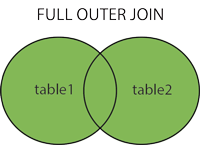
In SQL, a full outer join is a join that returns all records from both tables, wheter there's a match or not:

Full Outer Join

unfortunately MySQL doesn't support this kind of join, and it has to be emulated somehow. But how?

In SQL it happens often that the same result can be achieved in different ways, and which way is the most appropriate is just a matter of taste (or of perormances).

But this time the question is a little controversial, even on StackOverflow not everyone agrees and the solution marked as correct isn't actually the correct one.

Suppose we have the following tables:

Customers:

company_id name
1 Abc Company
2 Noise Inc.
3 Mr. Smith

Partners:

company_id name
2 Noise Inc.
4 The Pages

a full outer join would be written as:

select
  c.name, p.name
from
  customers c full outer join partners p
  on c.company_id = p.company_id

and the expected result is:

name name
Abc Company
Noise Inc. Noise Inc.
Mr. Smith
The Pages

to get the same result we have to combine a left outer join query:

select c.name, p.name
from
  customers c left join partners p
  on c.company_id = p.company_id

with a right outer join query:

select c.name, p.name
from
  customers c right join partners p
  on c.company_id = p.company_id

(the right join is quite uncommon because it's more difficult to read, and is equivalent to a left join with the order of the tables switched).

We could combine both queries with an UNION ALL clause, but this would return some duplicates (all rows where the join succeeds will be returned twice).

We could then use an UNION clause which will remove duplicates, but it will fail if one of the table has no primary key or unique constraints, or if the selected columns are not unique.

We could also use a different approach:

select c.name, t.name
from
  (select company_id from customers UNION
   select company_id from partners) n
  left join customers c on n.company_id = c.company_id
  left join partners p on n.company_id = p.company_id

which is often a good solution, but would fail if we allow the company_id to be NULL in one or both tables (a full outer join will return those rows, while the previous one won't).

The most general solution is this:

select c.name, p.name
from
  customers c left join partners p
  on c.company_id = p.company_id

union all -- don't remove duplicates

select c.name, p.name
from
  customers c right join partners p
  on c.company_id = p.company_id
where
  c.company_id is null

duplicates, if already present on the source tables, won't be removed. And the anti-join pattern on the second query assures that we are not introducing new duplicated rows.

SQL Markdown Builder

I like text editors, especially Sublime Text. And I like to work at the command line (on Linux, on Mac... but even on Windows 10 it has become very nice).

So it's pretty normal that everything I write is in Markdown syntax!

Since I work every day with SQL, and every day I have to prepare quick reports, extract some data, share some tables, share some rows... I needed a tool to run a SQL query against a database that returns a table in Markdown format!

This way I can easily copy & paste to a new mail, and format it nicely and professionally with markdown-here, quickly and without becoming crazy.

So I quickly wrote this tool and I called SQL Markdown Builder because it can easily be integrated with Sublime Text, even if it is not a native plugin.

Yes I know this is a little off topic from Mason and Sentosa, but this tool is written in Perl and... I included it in Sentosa anyway! So let's start!

Getting Started

Make sure you have installed perl, File::Slurp, Getopt::Long, DBI, and the DBD libraries for your database:

cpanm File::Slurp
cpanm Getopt::Long
cpanm DBI
cpanm DBD::SQLite
cpanm DBD::Pg
cpanm DBD::mysql
...

Run a query

Once everything is installed, you can write a single query, or more queries separated by a ; in a .SQL text file:

drop table if exists gardens;

create table gardens (
    id integer primary key,
    name varchar(100),
    city varchar(100)
);

insert into gardens (name, city) values
('Gardens By The Bay', 'Singapore'), ('Hyde Park', 'London'),
('Central Park', 'New York'), ('Villa Borghese', 'Rome'),
('Princes Street Gardens','Edinburgh');

select * from gardens;

and you can run your query file at the command line:

perl sqlbuild.pl -c dbi:SQLite:dbname=test.sqlite3 -s query.sql

the connection string is in the DBI format, this example is for SQLite so we don't need to specify a username or a password.

SQL Markdown Builder will execute every single query in sequence against the specified database. If the query is an INSERT or an UPDATE query, it will return '0 rows', otherwise it will return the results in Markdown format (nicely aligned):

0 rows
0 rows
0 rows

id | name                   | city
---|------------------------|----------
1  | Gardens By The Bay     | Singapore
2  | Hyde Park              | London
3  | Central Park           | New York
4  | Villa Borghese         | Rome
5  | Princes Street Gardens | Edinburgh

If some columns become too big, you can specify the maximum size of a column with -mw parameter (or use -h to see all parameters).

Instead of using the command line, you can also specify all connection strings, usernames, passwords inside the .SQL file itself:

/*
  conn="dbi:SQLite:dbname=test.sqlite3"
  username=""
  password=""
*/

This is very handy but not too secure (other users might peek inside your files, and also updating a password might become complicated).

Integration with Sublime Text

This is for Windows, but Linux and OSX will be very similar.

Just get the provided file Sql-mk-build.sublime-build, update the working_dir:

{
    "cmd": ["perl", "sqlbuild.pl", "-s", "$file" ],
    "working_dir": "c:\\GitHub\\Sql-mk-builder\\"
    "selector": "*.sql"
}

and move it to the build directoy:

C:\Users\YOURUSERNAMEHERE\AppData\Roaming\Sublime Text 3\Packages\User

then you can edit your .SQL files with Sublime Text, and see the results using CTRL+B.

Happy SQL & Markdown!